Web design · SEO · Analytics · Website launch
Website Launch Checklist: What to Measure Before and After Go-Live

A new website goes live, everyone agrees it looks better, and a month later someone asks whether it is actually working. Too often nobody can answer, because nobody recorded where things stood before the switch. This website launch checklist is built around that problem. It covers what to measure before go-live, the checks that protect your search visibility on launch day, and what to review in the 30, 60 and 90 days afterwards, so the launch can be judged on evidence rather than opinion.
It is the same sequence we follow on every web design project, written up so you can use it whoever builds your site.
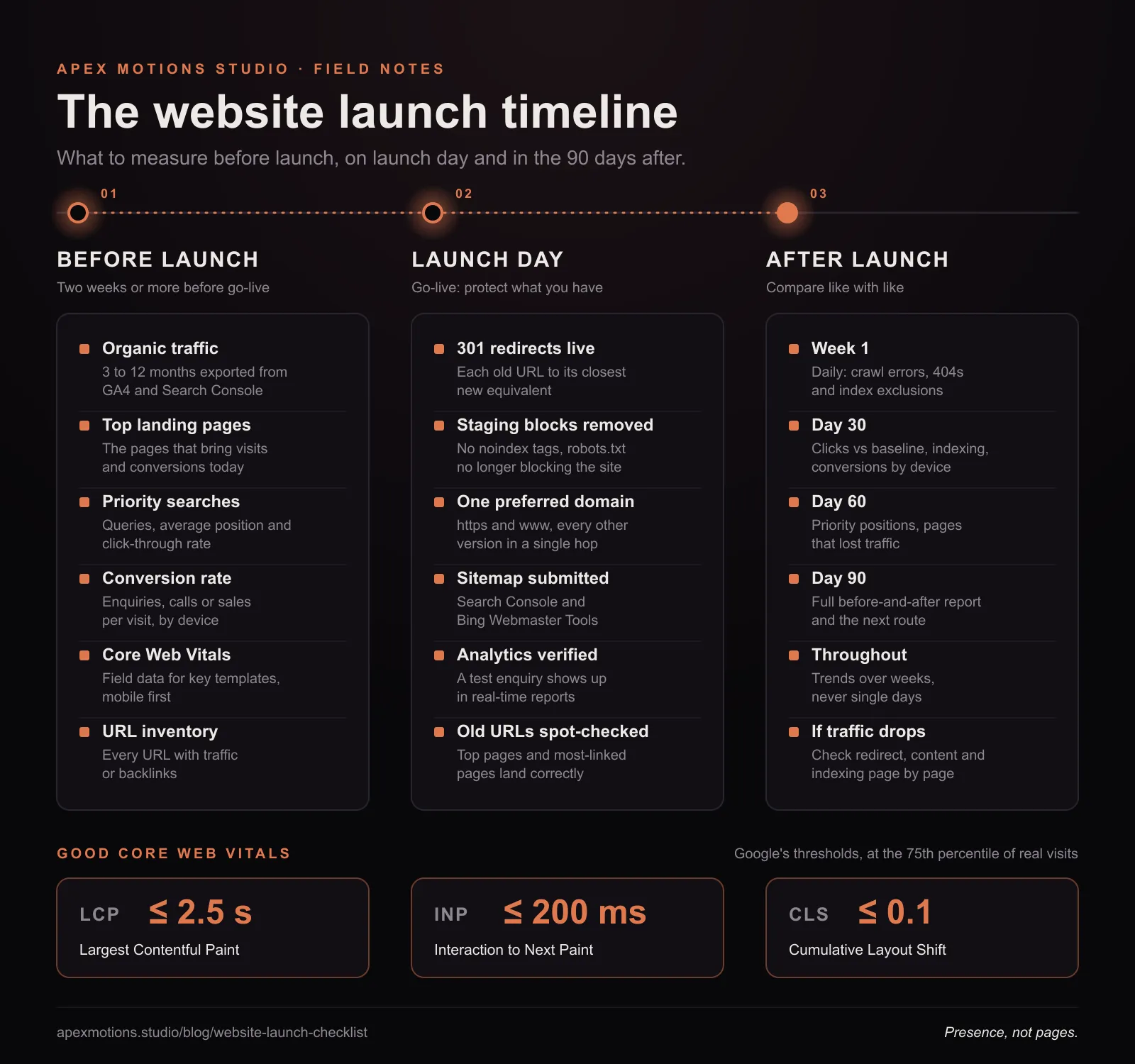
Why a website launch needs a measurement plan
A redesign changes many things at once: URLs, page structure, copy, images, code and often the analytics setup itself. Any one of those can move traffic or conversions up or down. Without a baseline you cannot tell whether a drop in enquiries is caused by the new site, the season or a competitor's campaign, and without a plan for launch day, avoidable mistakes such as missing redirects or a leftover "noindex" tag can undo years of search visibility in a week.
The goal is simple: know what "normal" looked like, protect it during the switch, and compare like with like afterwards.
Before launch: record the baseline
Start collecting this at least two weeks before go-live. If the old site will be switched off, export everything you need first, because some data can be hard to recover once the old pages have gone.
Pre-launch checklist
- Organic traffic and top landing pages. Export the last 12 months from Google Analytics and Search Console if you can, and at least the last three to six months. Note which pages bring in the most visits and the most conversions.
- Search queries and positions. From Search Console, export the queries that bring clicks, with average position, impressions and click-through rate. Keep a list of the ten to twenty searches that matter most to the business.
- Conversions and conversion rate. Enquiries, calls, sign-ups or sales, and the rate at which visits turn into them. This is the number a redesign is ultimately meant to improve.
- Core Web Vitals. Record Largest Contentful Paint, Interaction to Next Paint and Cumulative Layout Shift for your main templates, especially on mobile. Field data from real users (Search Console's Core Web Vitals report or PageSpeed Insights) matters more than a single lab test.
- A full URL inventory. Crawl the old site and combine the list with URLs from analytics, Search Console and any backlink tool. Every URL that receives traffic or links needs a destination on the new site.
- Backlinks to deep pages. Note which pages other sites link to. Those links carry authority, and they will only keep doing so if the pages redirect correctly.
- Paid campaign destinations. List every ad, email template and social profile that links to the site, so none point at a page that is about to disappear.
Check the new site before it goes public
- One descriptive title and meta description per page, and one H1.
- Canonical tags pointing to the correct final URLs, not the staging domain.
- Structured data validated with Google's Rich Results Test.
- Images compressed and sized, with meaningful alt text.
- Forms tested end to end: submission, confirmation message and the email that reaches your inbox.
- Mobile layouts checked on real phones, not only in a resized browser window.
Launch day: protect what you have
Launch day is about preventing losses. The most expensive mistakes are also the simplest, so work through the list in order and tick each item off.
Launch-day checklist
- Put 301 redirects live. Map every old URL on your inventory to its closest equivalent on the new site with a permanent (301) redirect. Avoid redirecting everything to the homepage; send each page somewhere relevant.
- Remove staging blocks. Check robots.txt no longer disallows the whole site and that no page carries a noindex meta tag left over from staging.
- Confirm the preferred domain. The site should resolve to one version (for example https with www), with the others redirecting to it in a single hop.
- Submit the XML sitemap. Add the new sitemap in Google Search Console and Bing Webmaster Tools, and use URL Inspection to request indexing of the key pages.
- Verify analytics and conversions. Visit the site, submit a test enquiry and confirm both the page view and the conversion appear in real-time reports.
- Test the old URLs. Spot-check a sample of old addresses, especially the top landing pages and the most-linked pages, and confirm each one lands in the right place.
- Update external links you control. Ads, email signatures, social profiles and your Google Business Profile should point at the new URLs directly.
After launch: the 30, 60 and 90-day checks
Expect some movement in the first few weeks while search engines recrawl and re-evaluate the site. Look at trends rather than single days, and compare equivalent periods: the same weeks last year are better than the weeks just before launch if your business is seasonal.
First week
Check Search Console daily for crawl errors, spikes in "not found" pages and pages excluded from the index. Fix any 404 that should have been a redirect as soon as it appears.
Day 30
- Compare organic clicks and impressions with the baseline for the same period.
- Review the Page indexing report: are the new pages being indexed, and have the old ones been replaced?
- Check conversion rate by device. A drop on mobile only often points to a layout or form problem.
- Look at the new site's Core Web Vitals as field data begins to accumulate.
Day 60
- Compare positions for your priority searches with the baseline list.
- Identify pages that lost traffic and check their redirect, content and internal links.
- Review which pages visitors leave from without acting, and test improvements to the worst of them.
Day 90
- Produce a full before-and-after report: traffic, rankings, conversions and speed.
- Decide what comes next, whether that is new content for organic SEO, landing-page tests or PPC campaigns to accelerate what is working.
What to measure, where to find it and what good looks like
| Metric | Where to find it | When to check | What good looks like |
|---|---|---|---|
| Organic clicks and impressions | Google Search Console, Performance report | Baseline, then weekly for 90 days | Back in line with the baseline within weeks, then trending upward |
| Top landing pages | Google Analytics 4, Landing page report | Baseline, day 30, day 90 | The same high-value pages still attract visits, now at their new URLs |
| Priority search positions | Search Console queries or a rank tracker | Baseline, day 30, day 60, day 90 | Stable or improving for the searches that matter to the business |
| Conversion rate | Google Analytics 4, Key events | Baseline, weekly after launch | Equal to or better than before, on mobile and desktop |
| Largest Contentful Paint (LCP) | Search Console Core Web Vitals, PageSpeed Insights | Before launch, day 30, day 90 | 2.5 seconds or less for at least 75% of visits |
| Interaction to Next Paint (INP) | Search Console Core Web Vitals, PageSpeed Insights | Before launch, day 30, day 90 | 200 milliseconds or less for at least 75% of visits |
| Cumulative Layout Shift (CLS) | Search Console Core Web Vitals, PageSpeed Insights | Before launch, day 30, day 90 | 0.1 or less for at least 75% of visits |
| Crawl errors and 404s | Search Console, Page indexing report | Daily in week one, then weekly | No important old URL returning a 404 |
| Indexed pages | Search Console, Page indexing report | Weekly for the first month | New pages indexed; old URLs shown as redirects, not errors |
The Core Web Vitals thresholds above are Google's published "good" levels, assessed at the 75th percentile of real visits. The other rows are deliberately qualitative: the right target is your own baseline, not someone else's average.
Worked examples
Example: a services firm with a traffic dip
For example, imagine a consultancy that relaunches its site and sees organic clicks fall noticeably in the second week. Because it exported its top landing pages beforehand, it can compare page by page and finds that most of the loss comes from three old guides. The redirect map sent all three to the new blog index instead of their rewritten versions. Pointing each old URL at its matching new article fixes the cause, and clicks begin to recover as Google recrawls them.
Example: an online shop with fewer sales on mobile
For example, suppose a small shop's new site holds its traffic but mobile orders slip. The baseline shows mobile conversion rate was steady for months before launch, so the change is real. Checking the checkout on an actual phone reveals that the postcode field now opens a full keyboard and a sticky banner covers the pay button on smaller screens. Both are quick fixes, and they would have been easy to miss without a number to compare against.
Common website launch mistakes
- Leaving noindex or a robots.txt block in place from the staging site, so search engines are told to ignore the new pages.
- Redirecting every old URL to the homepage, which search engines tend to treat like a missing page.
- Changing URLs that did not need to change. If an address works and ranks, keeping it removes a risk entirely.
- Launching without conversion tracking, or with forms that send enquiries nowhere.
- Judging the result after three days. Search engines need time to recrawl; give it weeks before drawing conclusions.
- Dropping content that earned traffic because it did not fit the new design. Rewrite and move it; don't delete it.
Website launch FAQs
How long does it take for rankings to settle after a website launch?
For most sites, movement settles within a few weeks to a couple of months, depending on the size of the site, how many URLs changed and how often search engines crawl it. Correct redirects and a submitted sitemap shorten that period.
Should I launch a new website on a Friday?
It is better not to. Launch early in the week, when the team is available to fix anything the checks uncover, and avoid your busiest trading period.
Do I need a new Google Analytics property for a new website?
Usually not. Keeping the same property preserves your history and makes before-and-after comparison easy. Add an annotation or note of the launch date so everyone reading the reports knows when the change happened.
What if traffic drops after launch?
Start with the pages that lost the most. Check each one's redirect, whether its content survived the move, and whether it is indexed. Most drops trace back to a handful of pages rather than the whole site.
Who should own the launch checklist?
One named person, even on a small team. Developers, designers, marketers and the business owner each hold part of the picture, and items fall between them when nobody is responsible for the whole list. That person signs off each stage before the next begins.
Plan the launch before you plan the party
A website launch should be the beginning of the climb, not the end of it. Measuring well is part of every web design project we run, and it is the starting point for ongoing SEO and PPC work. If you have a launch coming up and want a second pair of eyes on the plan, get in touch.